

When to use this guide
Before observing, define the control points’ role and relationship to the national spatial reference SANSRS. Separate planning, observations, processing and delivery; a final CSV alone cannot establish a control point’s provenance or solution quality.
KSA-GRF17 identifies a reference frame; it is not sufficient metadata for any GNSS export. GeoGiza’s converter and file viewer do not process GNSS baselines, RTK solutions or a SANSRS network, nor apply an official epoch/geoid procedure.
The checklists and examples are original GeoGiza guidance, not specification text, a translation or a compliance certificate. Consult the original document and project scope for applicable grades and mandatory limits.
Edition verified; currentness unconfirmed
Publisher, V1.0, copyright 2025 and page locators were checked on 11 October 2026. The copyright year is not a verified publication date. Currentness and any superseding update remain unconfirmed; check with GEOSA, the receiving authority and the project contract before adopting requirements.
What to prepare before review
- Point identifiers, descriptions, images, monument stability and network purpose.
- Tie provenance, frame, epoch, height type and responsible-authority procedures.
- Session logs, antennas/heights, equipment and raw files.
- Processing/validation reports, final coordinates and an ordered deliverables list.
Practical review steps
- 1
Plan an auditable tie
Identify reference points, data provenance and their relationship to the site. Record the reference-acquisition procedure and project epoch; distinguish established control from points awaiting validation.
- 2
Preserve raw observation records
Tie each session to its point, receiver, antenna, antenna-height measurement method and time. Record disruptions and repeats rather than relying only on a fixed-solution label.
- 3
Review processing and independent validation
Request processing, tie procedure and appropriate tests, then examine check points independent of the solution points. Calculation quality and reference identification are separate; successful processing does not resolve an unknown frame.
- 4
Deliver points with reference metadata
Use the existing points template to organize columns; attach frame, epoch, projection, zone and height metadata. The library sample is synthetic WGS84/UTM 36N data; renaming it does not make it Saudi control.
Understand the concept visually
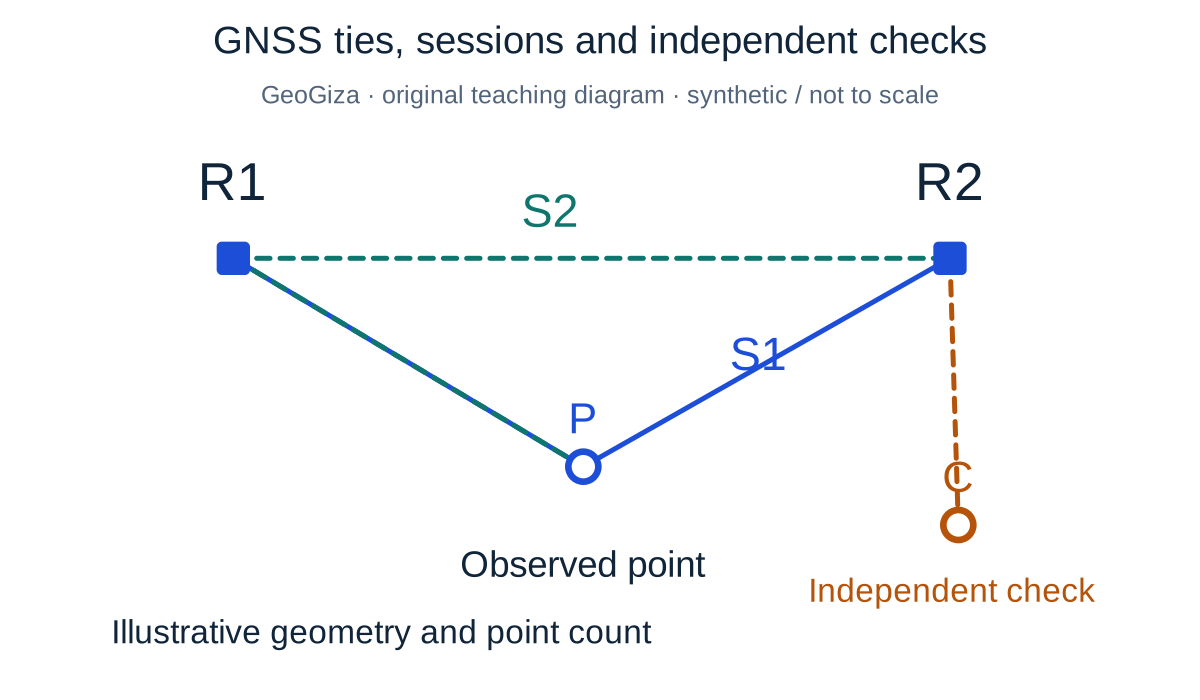
Original GeoGiza teaching diagram · synthetic data · not acceptance limits or official approval
GNSS ties, sessions and independent checks
R1 and R2 are synthetic reference points, P an observed point and C an independent check outside the adjustment. Two colors distinguish sessions S1 and S2; lines show observation/processing ties, not intervisibility requirements.
R1 / R2 = reference; P = observed; C = independent check; S1 / S2 = sessions
FIX alone does not establish coordinate quality; reference ties, observations, processing and checks must be traceable.
Point count and network geometry are illustrative, not a national minimum, session-duration rule or real CORS coverage. Record antenna type, height and measurement reference point.
Consult this topic’s document locatorsSYNTHETIC teaching example — not field observations or a tolerance limit
Synthetic example: two points, unknown epochs
Two files labeled KSA-GRF17 arrive, one from recent observations and one archived. Neither records epoch or tie provenance; both are proposed as control.
What to record in the review
Mark both as awaiting reference documentation; request tie, epoch and validation evidence before combining them. File names alone cannot establish a time-dependent shift or correction.
Mistakes affecting the review decision
- Equating a fixed GNSS solution with established control.
- Ignoring epoch and height type when combining files.
- Treating the teaching points sample as official Saudi observations.
Official sources and reading locators
Printed and PDF page numbers match in these copies. Source addresses are copyable under the publisher’s linking terms; consult the complete provision in the edition applicable to your project.
General Authority for Survey and Geospatial Information (GEOSA) · Technical reference
Technical Guidelines for Land Surveying
V1.0 · copyright 2025 · publication date not stated
- Locator:
- 2.6.2 — GNSS observation methods
- Printed pages:
- 67–71
- PDF viewer pages:
- 67–71
Publisher document address — copy into your browser:
https://geoportal.geosa.gov.sa/Geoportal/pdf/Land%20Survey%20Technical%20Guideline.pdf#page=67General Authority for Survey and Geospatial Information (GEOSA) · Technical reference
Technical Guidelines for Geodesy
V1.0 · copyright 2025 · publication date not stated
- Locator:
- 2.4.1 — GNSS observation, processing and deliverables
- Printed pages:
- 33–37
- PDF viewer pages:
- 33–37
Publisher document address — copy into your browser:
https://geoportal.geosa.gov.sa/Geoportal/pdf/Geodesy%20Technical%20Guideline.pdf#page=33Source checked:
Frequently asked questions
Do GeoGiza tools process raw GNSS observations?
No. Linked tools organize points, perform projection calculations and inspect files. GNSS processing, reference ties and validation need tools/procedures appropriate to the project.
What metadata should accompany KSA-GRF17 coordinates?
Document tie provenance, epoch, coordinate type, projection, zone, units, height type and processing. Consult the listed source locations and the receiving authority’s actual requirements.