

When to use this guide
Before commissioning a topographic survey, define intended use, site boundaries and required features. Review starts with control, coverage and reference, then file organization; a polished drawing does not establish field completeness.
This guide connects task scope to Saudi source locators without reproducing accuracy classifications or tables. The file viewer reveals some structural/coordinate issues; it does not validate observation accuracy or field-feature completeness.
The checklists and examples are original GeoGiza guidance, not specification text, a translation or a compliance certificate. Consult the original document and project scope for applicable grades and mandatory limits.
Edition verified; currentness unconfirmed
Publisher, V1.0, copyright 2025 and page locators were checked on 11 October 2026. The copyright year is not a verified publication date. Currentness and any superseding update remain unconfirmed; check with GEOSA, the receiving authority and the project contract before adopting requirements.
What to prepare before review
- Site boundary, purpose, required features and inaccessible areas.
- Control provenance, frame, epoch, height type and projection zone.
- Observation records, feature coding, breaklines and check points.
- Delivery format, layers, units, metadata and receiving-authority requirements.
Practical review steps
- 1
Turn the request into reviewable scope
Use the existing project brief to define extent, features and intended use. Record exclusions and how they will be represented; complete survey alone does not define the deliverable.
- 2
Review control and coverage
Match control to provenance, then compare coverage with agreed scope. Request independent validation and explanations for gaps; point count alone does not establish accuracy.
- 3
Inspect the model and file
Check names, layers, units, feature coding and point/breakline relationships. Open the file in the viewer and compare position with a known reference; keep raw observations separate from drawing/processing.
- 4
Record output limitations
Attach reference, epoch, height, coverage and validation metadata. Track issues with the handover checklist; avoid hiding a missing area within an apparently complete file.
Understand the concept visually
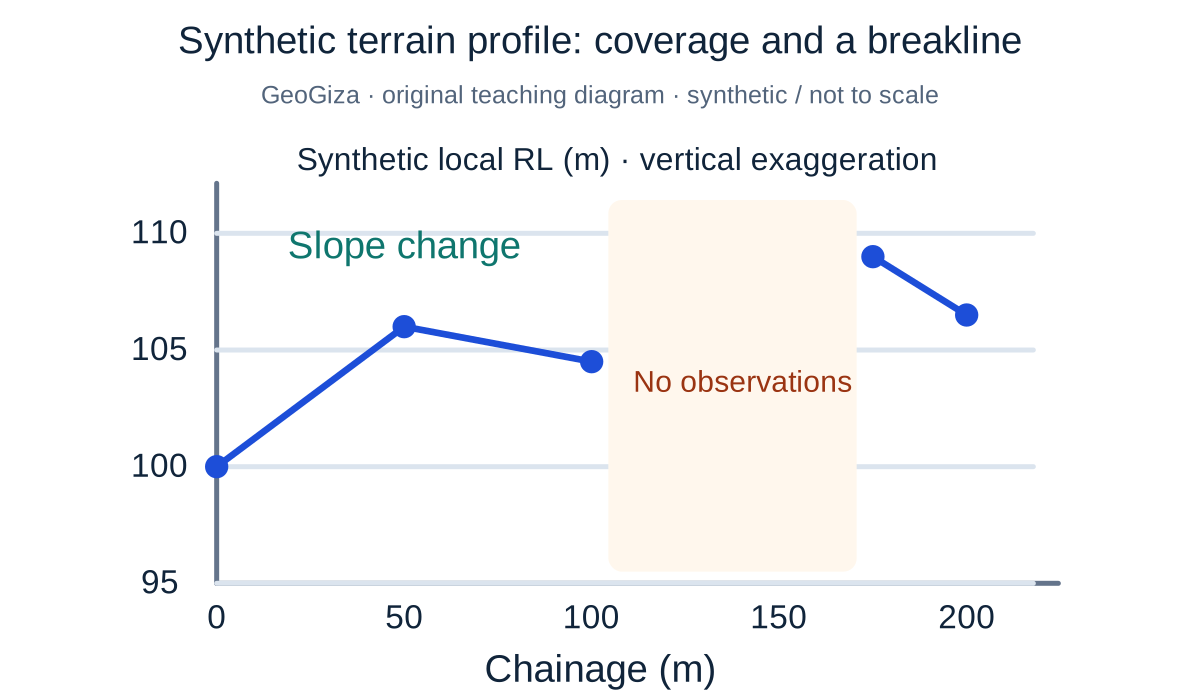
Original GeoGiza teaching diagram · synthetic data · not acceptance limits or official approval
Synthetic terrain profile: coverage and a breakline
The profile points are synthetic. A slope change illustrates a breakline, while an unobserved interval remains a gap instead of a line implying measurements that do not exist. Both axes are in meters, with vertical exaggeration.
x = chainage (m); y = synthetic local RL (m)
Interpolation cannot replace missing coverage or observations at changes in slope.
Not real terrain or an accuracy-approved model; the diagram’s point density sets no mandatory project survey density or scale.
Consult this topic’s document locatorsSYNTHETIC teaching example — not field observations or a tolerance limit
Synthetic example: apparently complete coverage
A synthetic file contains many points and organized layers, but an area behind a structure was not surveyed. The delivery record omits the gap and labels the file complete.
What to record in the review
Expose the gap, extent and reason; request completion or a documented scope decision. File organization does not resolve missing coverage.
Mistakes affecting the review decision
- Using denser points to compensate for missing control.
- Combining local elevations and GNSS heights in one model.
- Omitting exclusions or coverage gaps from delivery metadata.
Official sources and reading locators
Printed and PDF page numbers match in these copies. Source addresses are copyable under the publisher’s linking terms; consult the complete provision in the edition applicable to your project.
General Authority for Survey and Geospatial Information (GEOSA) · Technical reference
Technical Guidelines for Land Surveying
V1.0 · copyright 2025 · publication date not stated
- Locator:
- 2.4 — topographic surveying
- Printed pages:
- 52–54
- PDF viewer pages:
- 52–54
Publisher document address — copy into your browser:
https://geoportal.geosa.gov.sa/Geoportal/pdf/Land%20Survey%20Technical%20Guideline.pdf#page=52General Authority for Survey and Geospatial Information (GEOSA) · Technical reference
Technical Guidelines for Land Surveying
V1.0 · copyright 2025 · publication date not stated
- Locator:
- 2.2 — control network
- Printed pages:
- 12–25
- PDF viewer pages:
- 12–25
Publisher document address — copy into your browser:
https://geoportal.geosa.gov.sa/Geoportal/pdf/Land%20Survey%20Technical%20Guideline.pdf#page=12Source checked:
Frequently asked questions
Does opening a DXF establish survey accuracy?
No. Opening a file indicates one aspect of format integrity. Accuracy, coverage and ties require observations, validation reports and the agreed reference.
Do we need a separate Saudi topographic template library?
Use the existing generic templates with Saudi project requirements attached. This avoids duplicate files while reference and commission determine accuracy/scope.