

When to use this guide
Point exchange begins with a system definition, not a city name or file extension. Use one system record alongside CSV, CAD and reports: datum, projection, axes, units, height definition and conversion provenance.
Do not choose an EPSG code merely because a project is in Egypt. An available mathematical conversion does not establish an authoritative transformation grid, a documented geoid model or the tie accuracy required by your project.
The checklists and examples are original GeoGiza guidance, not specification text, a translation or a compliance certificate. Consult the original document and project scope for applicable grades and mandatory limits.
Edition verified; currentness unconfirmed
Publisher, edition covers and page locators were checked on 11 October 2026. Whether a later official edition supersedes these documents is unconfirmed; check with the responsible authority and the project contract before adopting requirements.
What to prepare before review
- Source and target system definitions from the originating document.
- Datum, projection, zone, units and Easting/Northing or longitude/latitude order.
- Height type and reference; epoch where relevant to the chosen frame.
- A known check point, transformation method and available accuracy limits.
Practical review steps
- 1
Read the system description before its EPSG code
Match the code to the datum, zone and units; consult the existing Egypt and EPSG pages rather than guessing from coordinate magnitudes. For local coordinates, request the local transformation definition.
- 2
Check axes and height separately
Use the existing point template for explicit column names. Define whether height means an elevation or an ellipsoidal height; do not claim a horizontal conversion changed the vertical datum without evidence.
- 3
Start with a check point
Convert a known sample and compare its location and values with a documented expected result. A reverse conversion can detect input errors but alone does not establish the correct datum or external accuracy.
- 4
Include the conversion record in delivery
Preserve the source file, both system definitions, conversion tool and date, and check result. Use filenames identifying the system and revision so outputs remain distinguishable from inputs.
Understand the concept visually
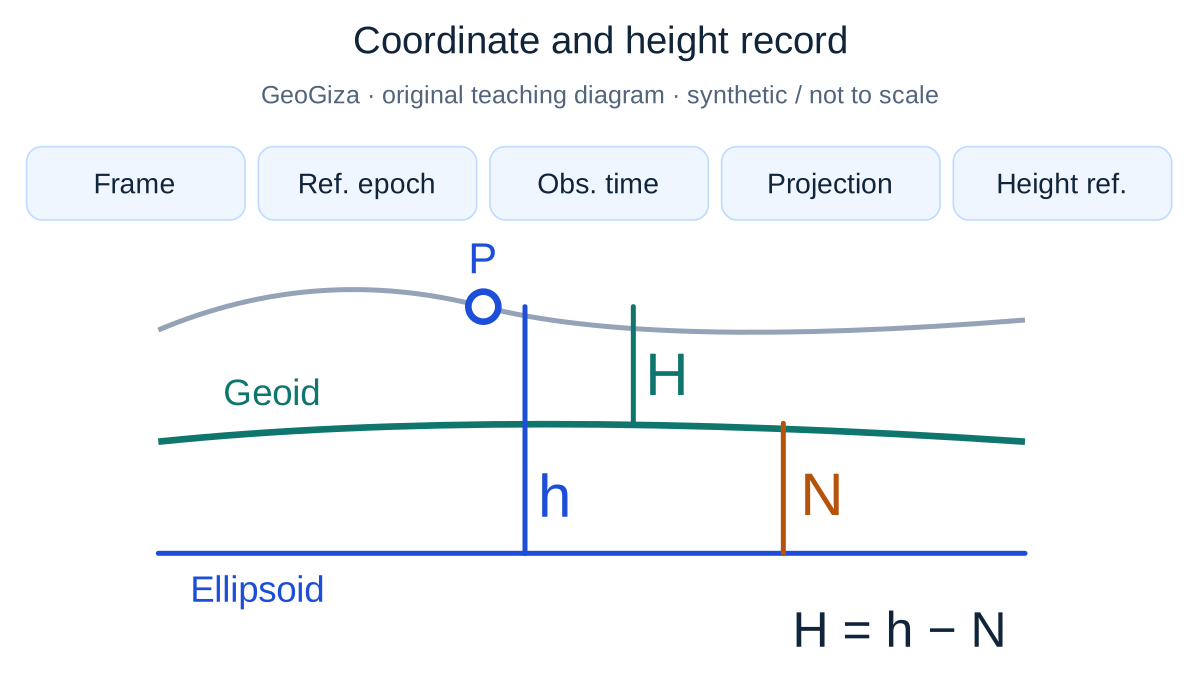
Original GeoGiza teaching diagram · synthetic data · not acceptance limits or official approval
Coordinate and height record
Frame, reference epoch, observation time, projection/zone and vertical reference are independent metadata fields, not automatic transformation steps. In a simplified orthometric case, h is ellipsoidal height, H orthometric height and N the signed geoid–ellipsoid separation.
Orthometric illustration: H = h − N
Projection does not automatically transform the vertical reference; observation time is not necessarily the frame reference epoch.
Not to scale; no geoid value or national-model implementation is shown. This orthometric relationship does not define every type of vertical reference.
Consult this topic’s document locatorsSYNTHETIC teaching example — not field observations or a tolerance limit
Synthetic example: points without a reference
The team receives a CSV with X, Y and Z columns and a Cairo project name. Neither the file nor the delivery email specifies datum, projection or height type.
What to record in the review
Request the system record and a check point from the sender before conversion. Do not select a system from the city or number range; record the input as insufficiently defined.
Mistakes affecting the review decision
- Swapping Easting/Northing or latitude/longitude during column mapping.
- Relabelling a code without performing a documented conversion.
- Treating an EPSG code as a complete height-processing or local-system specification.
Official sources and reading locators
Printed page numbers differ from PDF viewer pages. Open the official link and read the complete provision in the edition applicable to your project.
Egyptian Survey Authority · Technical reference
ESA technical specifications — Part I: surveying
First edition — 2020
- Locator:
- Chapter 1: sections 3–6
- Printed pages:
- 3–13
- PDF viewer pages:
- 24–34
Source checked:
Frequently asked questions
Can one system be used for every Egyptian survey file?
Identify the system from the source document and project requirements. The existing Egypt page collects technical options and references; it does not select the legal or contractual reference for you.
Is a reverse conversion enough to verify accuracy?
No. A conversion can return the same numbers even when the wrong reference was selected. A known reference or independent check point and an identified transformation method are needed.