

When to use this guide
Before fieldwork, turn “topographic map” into a reviewable scope: coverage, purpose, scale, required features, height representation and delivery formats. This helps prevent repeat surveying caused by mismatched expectations.
Part II is a separate mapping volume, not an update to Part I. Map quality is not established by file format, point count or image GSD alone; relate the observation method to product scale and required verification.
The checklists and examples are original GeoGiza guidance, not specification text, a translation or a compliance certificate. Consult the original document and project scope for applicable grades and mandatory limits.
Edition verified; currentness unconfirmed
Publisher, edition covers and page locators were checked on 11 October 2026. Whether a later official edition supersedes these documents is unconfirmed; check with the responsible authority and the project contract before adopting requirements.
What to prepare before review
- Purpose, coverage boundary, scale and required mapped features.
- Control and vertical references, layer codes and drawing units.
- Survey method, feature records and independent check points.
- Delivery formats, map and report requirements, and acceptance decision.
Practical review steps
- 1
Agree on the product before fieldwork
Use the existing project brief to define coverage, features, inaccessible areas and outputs. Attach the boundary sketch and record how missing coverage will be shown on the map.
- 2
Tie features to the control reference
Check system records and ties before combining files from multiple crews. Distinguish observed features from other-source features and retain each layer’s provenance and date.
- 3
Review geometry and representation
Inspect units, layers, point names and feature connectivity, then reconcile independent check points with the report. Converting CSV to KML or DXF does not improve observation accuracy or add unobserved details.
- 4
Record coverage and quality limits
Include final coverage, unobserved areas, check results and requirement provenance. Let the acceptance report identify work to complete rather than hiding coverage gaps in a final drawing.
Understand the concept visually
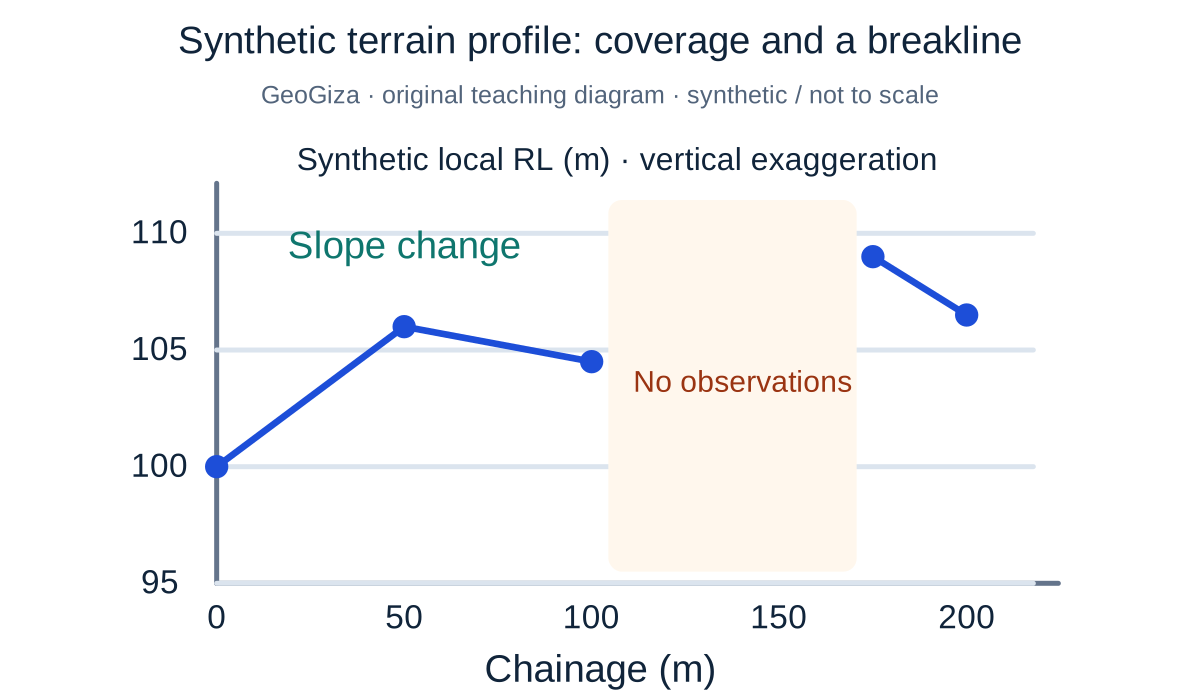
Original GeoGiza teaching diagram · synthetic data · not acceptance limits or official approval
Synthetic terrain profile: coverage and a breakline
The profile points are synthetic. A slope change illustrates a breakline, while an unobserved interval remains a gap instead of a line implying measurements that do not exist. Both axes are in meters, with vertical exaggeration.
x = chainage (m); y = synthetic local RL (m)
Interpolation cannot replace missing coverage or observations at changes in slope.
Not real terrain or an accuracy-approved model; the diagram’s point density sets no mandatory project survey density or scale.
Consult this topic’s document locatorsSYNTHETIC teaching example — not field observations or a tolerance limit
Synthetic example: incomplete coverage in a final map
A CAD file shows the site wall and elevations, but a locked storage area was not surveyed and is not marked in the drawing. The point list does not disclose the gap.
What to record in the review
Show the unobserved area on the map and in the report, and agree whether to complete or exclude it. Many points elsewhere do not resolve missing coverage inside that area.
Mistakes affecting the review decision
- Delivering a drawing without scale, reference or unobserved-area disclosure.
- Combining features from different systems without conversion and check records.
- Using image quality or a CAD extension as sufficient evidence of map accuracy.
Official sources and reading locators
Printed page numbers differ from PDF viewer pages. Open the official link and read the complete provision in the edition applicable to your project.
Egyptian Survey Authority · Technical reference
ESA technical specifications — Part I: surveying
First edition — 2020
- Locator:
- Chapter 2: 2-4, 2-5 and subsections
- Printed pages:
- 26–30
- PDF viewer pages:
- 47–51
Egyptian Survey Authority · Technical reference
ESA technical specifications — Part II: topographic maps
First edition — 2020
- Locator:
- Chapter 1: 2, 2-1 and subsections
- Printed pages:
- 6–9
- PDF viewer pages:
- 27–30
Source checked:
Frequently asked questions
Which specification volume covers field survey and maps?
Consult the field-survey locators in Part I and map-accuracy locators in Part II. The links below identify page ranges; both are first editions from 2020 and their currentness is unconfirmed.
Does converting a file change map accuracy?
Changing a format does not add observation accuracy. Check preservation of axes, units and layers, then compare the output with its source and independent check points.