

When to use this guide
Make delivery an evidence chain linking scope, observations, outputs and review. A file list is insufficient without system definitions, observation revisions and responsibility for resolving issues. Use the handover log to record each item’s actual status.
GeoGiza’s checklist is an organizational aid, not an exhaustive official checklist or an approval permit. The authority and contract determine the delivery package and acceptance process; a specification locator is not evidence that the project has been approved.
The checklists and examples are original GeoGiza guidance, not specification text, a translation or a compliance certificate. Consult the original document and project scope for applicable grades and mandatory limits.
Edition verified; currentness unconfirmed
Publisher, edition covers and page locators were checked on 11 October 2026. Whether a later official edition supersedes these documents is unconfirmed; check with the responsible authority and the project contract before adopting requirements.
What to prepare before review
- Contract scope, required deliverables, reference and edition.
- Raw observations, processing files, maps, point lists and revisions.
- Check reports, issue log and responsibility for each resolution.
- Receiving-authority requirements and actual acceptance documents, if issued.
Practical review steps
- 1
Create a clear package index
List each file’s name, purpose, revision, date and system. Tie outputs to the requirements they address and record pending files rather than marking items complete by default.
- 2
Reconcile maps, points and reports
Check a shared point sample across drawing, list and report, including units and heights. Use the viewer to inspect structure, then attach a documented comparison; a preview alone does not verify accuracy.
- 3
Separate package completeness from acceptance
A complete package can still have unresolved technical issues. Record delivery completeness, review outcome and approval separately with evidence; an email submission is not official acceptance.
- 4
Close issues with a traceable revision
Retain the issue, response, revised file and reviewer decision date. If a reference or height changes, check all dependent files before issuing the final revision.
Understand the concept visually
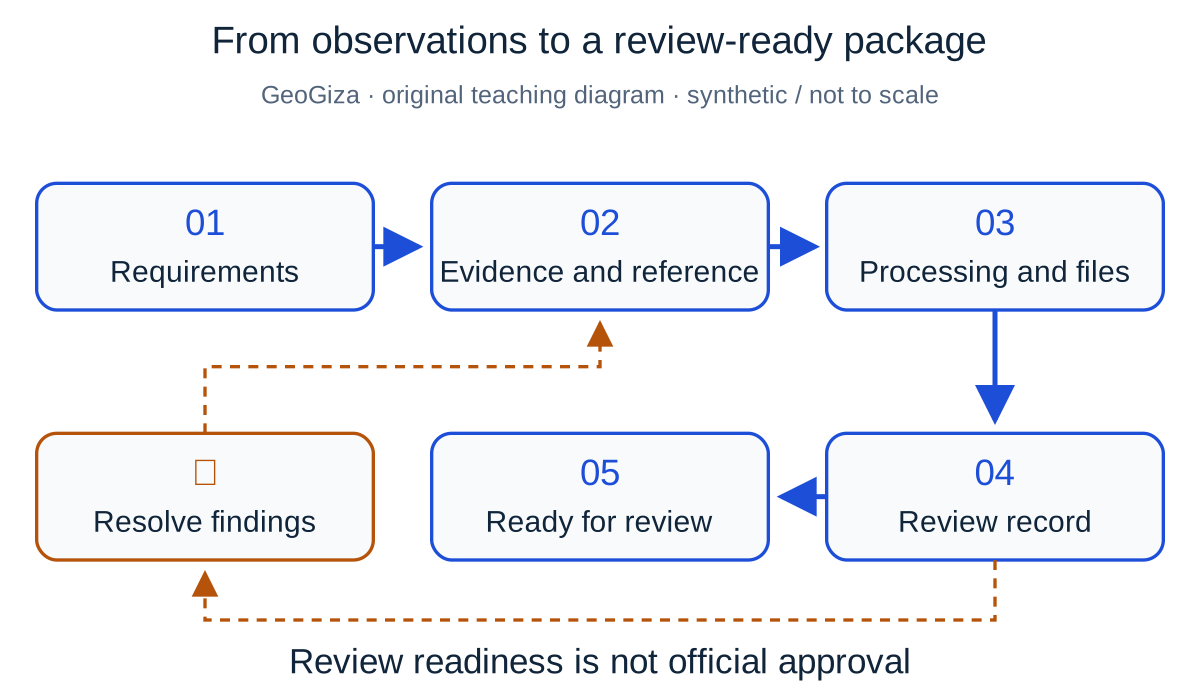
Original GeoGiza teaching diagram · synthetic data · not acceptance limits or official approval
From observations to a review-ready package
Connect requirements with the file register, reference metadata, observations, processing, outputs and review record. Unresolved findings return for correction before the package is submitted for technical review.
Requirements → evidence → findings → technical review
The presence of files does not establish data quality or formal acceptance by the receiving authority.
Teaching workflow: “ready for review” differs from receipt of files, acceptance and official approval.
Consult this topic’s document locatorsSYNTHETIC teaching example — not field observations or a tolerance limit
Synthetic example: complete delivery, unresolved issue
CAD, CSV and PDF files were delivered, but the review report asks for benchmark provenance. No record resolves the issue or demonstrates receiving-authority acceptance.
What to record in the review
Record the files as delivered, the review as pending and approval as undocumented. Add benchmark provenance, affected files and the reviewer’s decision before changing status.
Mistakes affecting the review decision
- Marking a package approved because all requested file extensions are present.
- Mixing old and new map and point-list revisions.
- Closing an issue without preserving the response and verification evidence.
Official sources and reading locators
Printed page numbers differ from PDF viewer pages. Open the official link and read the complete provision in the edition applicable to your project.
Egyptian Survey Authority · Technical reference
ESA technical specifications — Part I: surveying
First edition — 2020
- Locator:
- Chapter 2: 1-4-4 — processing report
- Printed pages:
- 21
- PDF viewer pages:
- 42
Egyptian Survey Authority · Technical reference
ESA technical specifications — Part I: surveying
First edition — 2020
- Locator:
- Chapter 2: 2-8
- Printed pages:
- 32
- PDF viewer pages:
- 53
Egyptian Survey Authority · Technical reference
ESA technical specifications — Part II: topographic maps
First edition — 2020
- Locator:
- Chapter 2: 16, 17 — review and quality assurance
- Printed pages:
- 88–89
- PDF viewer pages:
- 109–110
Source checked:
Frequently asked questions
Is the free handover checklist an ESA form?
No. It is an original GeoGiza organizational template. Consult the responsible authority, contract and original document for project-specific items and acceptance procedures.
Where are report and map-review source locators?
Part I: chapter 2 sections 1-4-4 and 2-8; Part II: chapter 2 sections 16 and 17. The links below distinguish printed pages from PDF viewer pages for navigation.